Video 7 of 7 · 2:23 · Watch in order
Video 7: Multi Project Staffing Analysis in AutoCAD
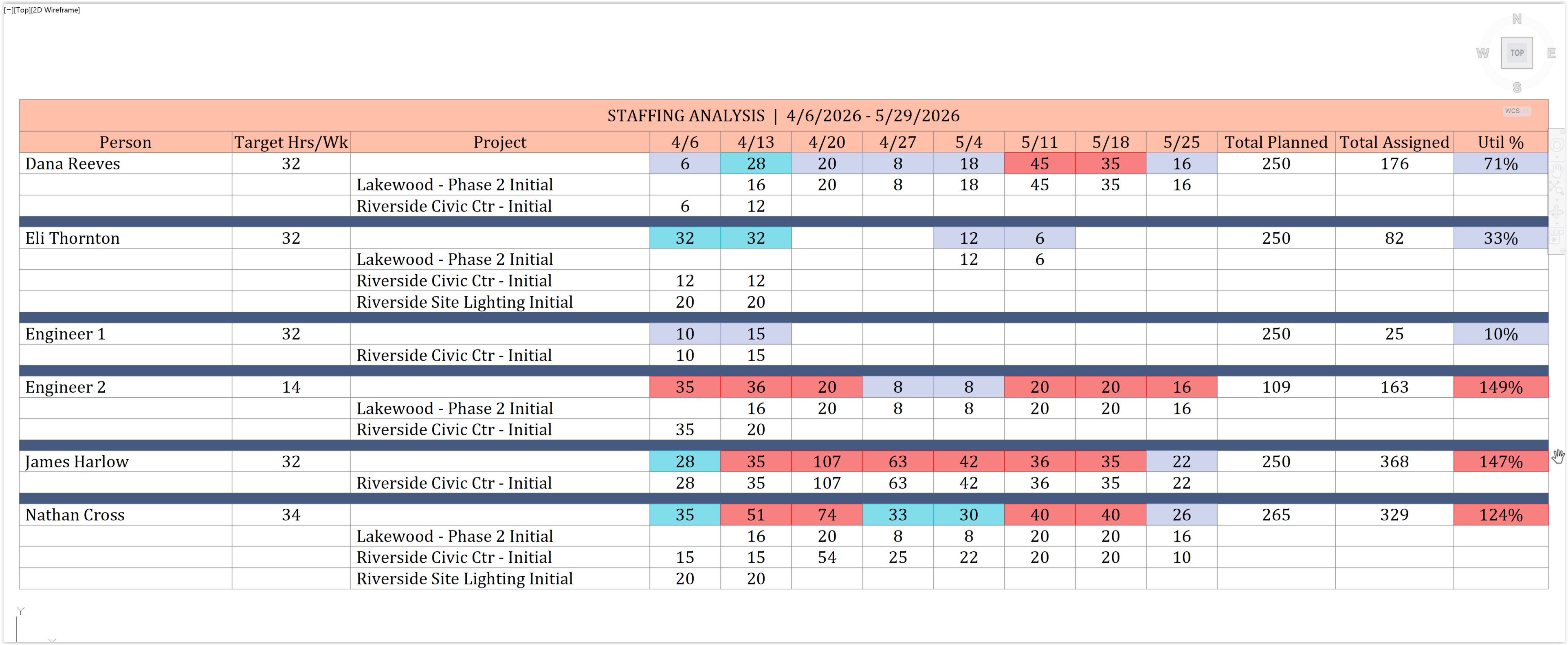
When the same people are staffed across several projects at once, CPMCAD aggregates planned hours and forecasts weekly utilization per person, so you can see who is overloaded before it becomes a problem.
How to run a multi project staffing analysis in AutoCAD
- Load the schedules for each active project. CPMCAD reads resource assignments from every project's Excel workbook, using the same Resources sheet structure and Hours Per Week availability defined in each file.
- Aggregate planned hours per person across projects. Every activity's resource assignment contributes planned hours to that person's total for the week, summed across all the projects they are staffed on.
- Forecast weekly utilization. CPMCAD compares aggregated planned hours against each resource's Hours Per Week availability and produces a color coded utilization forecast, overloaded, on target, or underutilized.
- Review the per project breakdown. For anyone flagged as overloaded, drill into which specific projects and activities are driving the load, so you know exactly where to rebalance.
- Draw the output to CAD or export to Excel. Generate a staffing analysis drawing directly in AutoCAD for a project meeting, or export the same data to Excel for a resourcing report.
- Rebalance and rerun. After reassigning work or adjusting durations, reload the updated schedules and regenerate the staffing analysis to confirm the overload is resolved.
What you will see in the video
Video overview (based on the CPMCAD feature description)
CPMCAD aggregates planned hours across multiple projects and forecasts weekly utilization per person. Color coded output shows who is overloaded, on target, or underutilized, with per project breakdowns drawn to CAD and exported to Excel.
This works by reading the same Resources sheet structure and Hours Per Week availability already defined for each project, then summing every activity's resource assignment into a per person weekly total across all active projects. The result is a utilization forecast you can review before a resourcing conflict becomes a schedule problem.
Note: no production script exists yet for this video, since it was added to the channel after the original five part series. This overview is written from the multi project staffing analysis feature description on cpmcad.com. Replace it with an accurate transcript once the video is finalized.
Try it on your own schedule
CPMCAD offers a full-featured 30-day free trial, or $250/year for unlimited use and clean, watermark-free output.